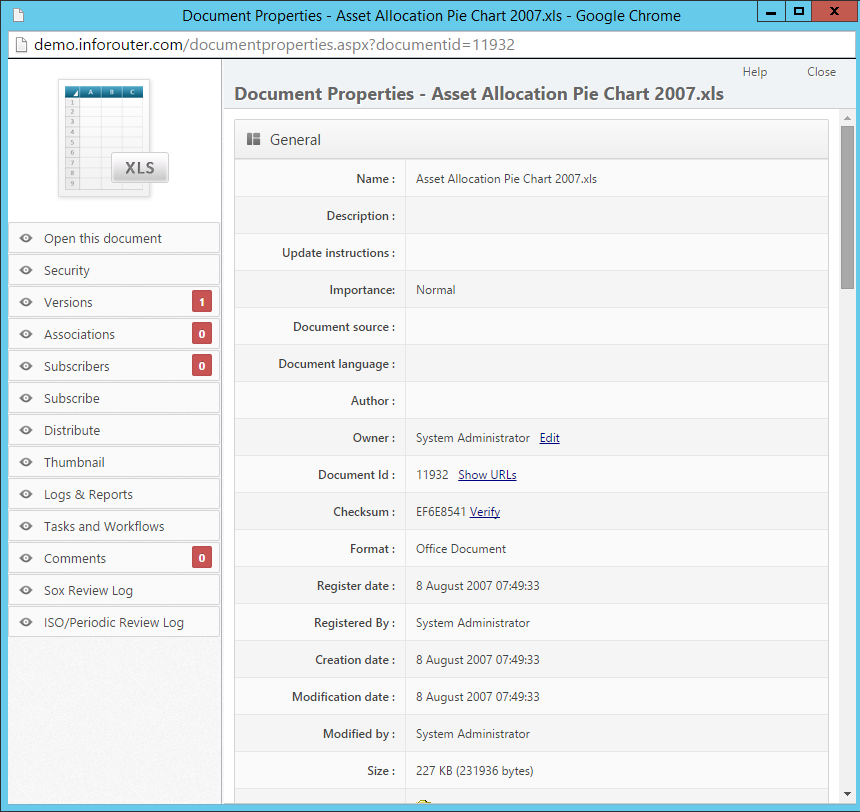
Document Properties
Document properties contain metadata and settings for each document in infoRouter. View properties by clicking the Action icon and selecting Document Properties .
Property
Description
Name Document file name
Description Optional description of the document
Update Instructions Text included in notification emails to subscribers
Document ID Unique internal identifier
File Naming
Do not use these special characters in document names: \ / : * ? " < > |
Classification & Importance
Importance Levels
Level
Use For
Low Minor or reference documents
Normal Standard documents (default)
High Important documents requiring attention
Vital Critical documents
Classification Levels
Level
Description
No Markings Unclassified
Declassified Previously classified, now released
Confidential Limited distribution
Secret Restricted access
Top Secret Highly restricted
Property
Description
Document Source Original source of the document
Document Language Language the document is written in
Author Original author (may differ from uploader)
Owner Current document owner
Keywords Search keywords associated with the document
Tags Tag values applied to the document
Property
Description
Register Date Date first created in infoRouter (read-only)
Registered By User who uploaded the document (read-only)
Creation Date Document creation date in infoRouter
Modification Date Last modification date
Modified By User who last modified the document
Property
Description
Format MIME type (Office Document, PDF, etc.)
Size File size in bytes
Folder Current location
Document Type Category (Financial, Letter, Memo, etc.)
Checksum Value for verifying document authenticity
Creating Document Types
Check Out Status
Property
Description
Checked Out By User who has the document checked out
Check Out Date When the document was checked out
Workflow Status Current workflow state (if applicable)
Completion Settings
Property
Description
Percent Complete Progress indicator (0-100%)
Completion Date Date marked complete
Completed Documents
When a document is set to 100% complete or has a completion date, it cannot be checked out until the status is changed.
Retention & Dates
Property
Description
Retain Until Date until which document must be kept
Disposition Date Scheduled destruction date
Expiration Date document becomes obsolete
Downgrade On Date to lower classification level
Declassify On Date to remove classification
Publishing & Review
Property
Description
Publishing Rules Which version users see when viewing
ISO/Periodic Review Scheduled review dates
Publishing | Periodic Reviews
Additional Sections
Section
Description
Rendering Options View document in different formats
Custom Properties User-defined metadata fields
See Also